Search This Site :-
Showing posts with label PC Tricks. Show all posts

Jan 31, 2009

Windows 7 Wallpapers high resolution

Windows 7 is the next Operating System developed by the Software giant Microsoft.Right now it is in beta stage and unlike its predecessor, Windows 7 is intended to be an incremental upgrade to Vista, with the goal of being fully compatible with device drivers, applications, and hardware which Windows Vista is already compatible with.
Here are the some of the best Wallpaper collection for Windows 7 (you can use them on any version of windows):
1.Windows seven wallpaper by Frnak:

Windows seven wallpapers

Windows seven wallpapers


Download
2.Windows Seven Wallpapers by Pablosoccer:
windows 7 wallpapers collection

windows 7 wallpapers collection


Download

Remove junk files from PC with C Cleaner

CCleaner is a freeware system optimization, privacy and cleaning tool. It removes unused files from your system - allowing Windows to run faster and freeing up valuable hard disk space. It also cleans traces of your online activities such as your Internet history. Additionally it contains a fully featured registry cleaner. But the best part is that it’s fast (normally taking less than a second to run) and contains NO Spyware or Adware!

It cleans the following :

  • Internet Explorer:
    Temporary files, history, cookies, Autocomplete form history, index.dat.
  • Mozilla:Temporary files, history, cookies, download history, form history.
  • Registry Cleaner:Advanced features to remove unused and old entries, including File Extensions, ActiveX Controls, ClassIDs, ProgIDs, Uninstallers, Shared DLLs, Fonts, Help Files, Application Paths, Icons, Invalid Shortcuts and more… also comes with a comprehensive backup feature.
  • Third party Applications:Removes temp files and recent file lists (MRUs) from many apps including Media Player, eMule, Kazaa, Google Toolbar, Netscape, Microsoft Office, Nero, Adobe Acrobat, WinRAR, WinAce, WinZip and many more…

Download From here

Nov 23, 2008

How to remove Virus from USB Drives

One of the ways by which a virus can infect your PC is through USB/Pen drives. Common viruses such as ’Ravmon’ , ‘New Folder.exe’, ‘Orkut is banned’ etc are spreading through USB drives. Most anti virus programs are unable to detect them and even if they do, in most cases they are unable to delete the file, only quarantine it. Here are the things which you can do if you want to remove such viruses from your USB Drive

Whenever you plug a USB drive in your system, a window will appear similar to the one shown below

USB

Don’t click on Ok , just choose ‘Cancel’. Open the Command Prompt by typing ‘cmd‘ in the run box. In the command prompt type the drive letter: and press enter . Now type dir /w/a and press enter.

This will display a list of the files in the pen drive. Check whether the following files are there or not

  • Autorun.inf
  • Ravmon.exe
  • New Folder.exe
  • svchost.exe
  • Heap41a
  • or any other exe file which may be suspicious.

If any of the above files are there, then probably the USB drive is infected. In command prompt type attrib -r -a -s -h *.* and press enter. This will remove the Read Only, Archive, System and hidden file attribute from all the files. Now just delete the files using the command del filename. example del Ravmon.exe. Delete all the files that are suspicious. To be on a safer side, just scan the USB drive with an anti virus program to check whether it is free of virus or not. Now remove the drive and plug it again. In most of the cases, the real culprit turns out to be the “Autorun.inf” file which mostly gets executed when someone clicks Ok in the dialog window which appears above. Thus the infections can spread

Security Tip

Disable the Autoplay feature of USB drives. If you disable the Autoplay feature of USB drives, then there are lesser chances of the virus spreading. A tool which can perform such a function is Tweak UI. Download it from here install it.

Tweak UI

Run the program. Now you can disable the Autoplay feature of the removable drives as shown above. By following the above steps, you can keep your USB drives clean.

Oct 31, 2008

Download Wikipedia DVD for Offline Reading


Everyone loves reading articles on Wikipedia as they are free and easily accessible but what if you fall in a situation where you don’t have access to the Internet and you want to access Wikipedia to reference one of your projects or assignments?

The Wikimedia Foundation has released an offline Wikipedia for Schools selection which carries articles on over 5500 topics and can be burned to a DVD for offline reading.

Notice that the ‘Wikipedia for Schools’ version is only recommended for use by students of age 8-18 as it only consists of topics relevant to their education, however in my future posts I will be sharing a tip to download a full offline-version of Wikipedia for offline reading.

Wikipedia for Schools is as big as 3GB in size and can be downloaded via BitTorrent.

Download Wikipedia for Schools DVD

Set Multiple Home Pages In Firefox

Did you people ever wish to set-up multiple home pages in Firefox ?

I yes, then you are at the right place. So here’s the way to do this little but useful little trick.

Suppose you would like to set Orkut, Google and my blog :) as your homepages. Then try this tweak in Firefox to set multiple homepages. This is what you should do :

  • Goto Tools>Options>Main
  • In the When Firefox starts drop down menu choose Show my home page
  • In Home page give your homepages separated by a | (pipe symbol)

Multiple Home Pages In FF

Example: http://www.google.com|http://www.orkut.com|http://cooltipsntricks.blogspot.com

  • Click OK
Now next time when you start Firefox all of your three home pages will be displayed simultaneously.

Oct 3, 2008

Blender 2.46

Blender is the open-source software for 3D modeling, animation, rendering, post-production, interactive creation and playback.It can be used to produce computer-generated images and movies. It is open source freeware, so it costs nothing to use.

e637ade87d

Version 2.46 includes cloth and fur simulation, physics caching and baking, shading, glossy reflection and refraction, raytraced soft shadows, improved rendering features, and more.

Sys Req:Windows 98/Me/2000/XP/Vista |8,910 KB | Freeware | Version:2.46

Aug 31, 2008

Creating Invisible Folder in XP

If you have folders on your computer that you want to keep private, this trick will work for you, you just need to remember where you placed them. This hidden folder can be made; however, it is necessary to show all the folders whenever it is required. How can you make an invisible folder? You have to follow these simple steps and your unmentionables will stay hidden away.
1. Decide where you want the invisible folder to be located, right click on that location and select the option “Create a new folder.”


2. Select the folder, right click on it and click on rename option.
3. If you attempt to end here, windows will say that you must provide a name. Here are the instructions to solve this problem. With the number lock on and the field name still active, press and hold ALT and press 0160 on the number pad - then release ALT. A folder should appear with a blank name next to it. 4. Right click on the folder without a name. Choose Properties.


5. Click on the Customize tab.


6. Click on the Change Icon button. Browse through your icons until you find the one that has no image.
7. Click on OK and your folder becomes invisible!
It will allow you to hide things that you don’t want readily available to anyone else. You will be able to hide anything from video games at your workplace, to family pictures or anything else you can think of. If you place it on your desktop, the folder will appear briefly. Due to this, it would be a wise idea to put it inside of a folder, or to hide it amongst a group of folders where it would be less likely to be seen. Enjoy hiding!

Tutorial made by : Saurabh Gupta


:)

Aug 20, 2008

Crater Calculator

This is a very nice, fun, interesting, and overall destructive little interactive flash Meteor Impact Calculator.

I’ve spent the better part of an hour making various sizes, and speeds, and angles, and types of rock to see what happens, and, so far in all of them, I am dead. Oh well, the world’s gonna end anyway, at least I’ll have a front row seat!

Here’s an example i went through:

size angle speed type

3300m wide, 27 degree angle, 30km/s, rock hitting rock.

carter size

That’s a decent sized crater, 770meters deep, and a 9 on the Richter scale, not bad i’d say.

crater with empire state building

Deeper then The Empire State Building though, that’s tough.

data sheet

I’d wager that I probably wouldn’t have survived, i mean, I’m mostly covered in 3rd degree burns and whatnot. Oh well, at least it only happens ever 18 million years or so.

The LEGO computer (case)

LEGO case 1

Even before I got truly into computers, I wanted to make a LEGO computer case. Eventually, price moved me away from actually making one, as it would have cost well more then the cheapest case went to make one, and being the poor student I am, I decided maybe next time. This kid Luke on the other hand decided to just go ahead and spend all his money on the bragging rights (I don’t actually know if he spent all his money on this). But, you’re earned them my good friend.

LEGO case 2

Here’s a time lapse video of him putting it together, he says it took 2 hours to put together at 1039 total pieces, that’s not bad at all.

When I make my LEGO computer, it will house a full ATX motherboard, and at least 2 hds, and some other stuff. It will also be made of random colored pieces put together however i grab them.

Aug 17, 2008

Brand Windows with Your Name

Let's do some fun stuff today....open notepad dump the following lines into it and save it with the name OEMINFO.INI in the c:\windows\system32 directory:-------------------------------------------------------------------------------------[General]Manufacturer=Your Name HereModel=Your Model Here[Support Information]Line1=Your Name HereLine2=Your Address HereLine3=Your Email Address Here-------------------------------------------------------------------------------------1. Save the file.2. Then make a right click on my computer select properties, in the general tab a button will be highlighted (support information) make a click on it, you will be able to see the changes.3. Now if you want to display some more information then simply increase the line in the file.ex: Line4=Your Working Hours Here

How to Hide the Partitions?

This trick is for all those people who wants to hide tons of data into their box. So here it is, if you have very important data in your hard drive placed in some partition which you do not want anybody to see then this trick is only for you!!!
1. Just click on start>run type gpedit.msc
2. Now navigate through user configuration> administrative templates > windows components> windows explorer
3. Double click on “Hide these specified drives in My Computer” modify it accordingly.
4. Then just below you will find another option “Prevent access to drives from My Computer”, double click on this option and modify it accordingly.
5. To make it visible again select "disable" by double clicking on the “Hide these specified drives in My Computer” option.
WARNING:Don't try to experiment with other options in gpedit.msc if you don't know, what exactly your doing. Just have some patience and follow my tutorials regularly, i am going to tell you everything that is configurable in windows [and those also which you thought before, "Seems not possible to change ;-)" ].***anyways if you having any problem to apply this trick, comment me. You will be helped.

Aug 6, 2008

Fun! Fun! Fun!... Browser Shaking

This is a fun little trick that can create a shaking screen on your web browser (i.e. Internet Explorer, etc..)
The trick is simply a small Java Script that causes your browser window to move to different positions, causing a shake of your entire screen. It's kind of cool to watch and see what Java Script can do! Try it out..
Use this trick at your own risk.
Here's how: Copy this entire line and paste it onto your address box, then press Enter:


javascript:function Shw(n) {if (self.moveBy) {for (i = 35; i > 0; i--) {for (j = n; j > 0; j--) {self.moveBy(1,i);self.moveBy(i,0);self.moveBy(0,-i);self.moveBy(-i,0); } } }} Shw(6)

Jul 6, 2008

Deadliest Keylogger - Hardware Keylogger

Everyone might be aware of the keyloggers. The small piece of software that records the sentences and commands that the user inputs into the computer. It is used to steal personal information, including the user's name, account number, PIN and email address. Well, not always, but most of the time, it is easy to detect the presence of keylogger on some foreign or shared computer. Therefore, by restricting yourself from using some confidential information on shared computer, you can protect your important documents.

Now what about your own computer? Well you use latest and updated antivirus and antispyware, you protect your system with smart password, you monitor each and every outgoing connection. Still, you can be hacked !!!!! And the hacker is a small nifty device called hardware keylogger.

A hardware key logger is a small piece of hardware which is usually inserted between the keyboard port and the keyboard. The hardware key logger then records all user keystrokes to it's internal memory. These devices have memory capacities between 8Kb and 2MB. Sitting between your keyboard and its port, this tiny plug-in device records every keystroke typed on any PC computer.

It can record and retrieve everything typed, including emails, chatroom activity, instant messages, website addresses, search engine searches and more .

Features Of Keylogger :

1) Easy to use. No new software to install or learn. (software free device)
2) Installs in seconds, just plug it in.
3) Can be unplugged and information retrieved on another PC.
4) Uses no system resources.
5) Excellent real-time backup device.

Price :

Hardware Keylogger ranges from $129 to $299. The price depends upon the encryption technology used by the keylogger.

Conclusion :

Hardware keylogger is the deadliest keylogger I've ever came across. By formatting your computer, you can relieve yourself from software keylogger but what about the hardware piece if you are not able to spot it ?

BitTorrent - Make Your Machine A Torrent Tracker

One of my friend referred me to an article where I was amazed to see the power of P2P model. The title of article revealed itself to me.

"Dropping 22TB of patches on 6,500 PCs in 4 hours: BitTorrent"

What they did was to use bittorrent to deploy the patches. By this, there was no need of buying more servers nor there was any need felt to increase the bandwidth.

Therefore this article is dedicated on how make your own machine a BitTorrent Tracker.

Server :

The server will consist of Ubuntu with all the typical applications of LAMP. We need to have Apache with MySql and PHP so that we can install a tracker such as phpMyBittorrent on it. Though the installtion can also be done on any Windows machine, still I would recemmond you to install Ubuntu.

In the tracker software, I would create several different categories based on the target systems that I would use. For example, there would be Windows XP, Windows Vista, Office 2007, etc. categories. Each category would have its own RSS feed.

Main Steps For Server :

1) Download phpMyBittorrent from here.
2) Extract the downloaded zip file to the www folder of Apache.
3) Open the URL "http://localhost/html/index.php"
4) Follow the instructions.

Client :

At the client side, you can use any torrent client like uTorrent, BitTorrent, or BitTornado. You can make the torrent from uTorrent which has an option to make torrents. Then upload that torrent to the server and start seeding it.

Conclusion :

I think that this type of a delivery system has great potential. You could even use it across slow bandwidth links or to deploy other software, not just patches.

This is a project that I am hoping to spend some time on over the next while but I am looking for your input/suggestions now so that I can hopefully avoid some pitfalls later. Any input would be greatly appreciated!

BitTorrent image
Website: bittorrent.com
Location:San Francisco, California, United States
Founded: September 1, 2004
Funding: $33.8M

BitTorrent Inc is the company founded by the creator of the algorithm of the same name. The companies purpose to use the algorithm’s ability to transmit large quantities of data across the internet to legally sell content and help companies… Learn More

May 2, 2008

Defragmenting Individual Files Instead of whole Drive

Whenever you install a program or copy/delete data - file ends up chopped up into chunks and stored in multiple locations on the disk resulting into fragmentation. Defragmentation process help reduce this fragmentation and keeps Track of all stored Data. BUT ...
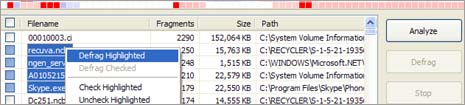
The default Windows Defragmentation utility only allows you to defrag the whole drive (or drive partition). This can take up hours and result in lose of productive PC usage time. With Defraggler, you can defrag individual files and thus save time.


Details: Defraggler - Features

http://www.thewaysoft.com/images/download.gif Download

After you download and install this program - run it, select the file and defragmentation is completed quickly. Besides individual files, you can also use it to defrag the whole drive. Besides being a FREE utility, it supports all OSs released since Windows 2000, this includes Windows 2000, 2003, XP and Vista.P.S. To use Windows default defrag utility, right click on drive icon in ‘My computer’ window and select ‘properties’ option. Then click on ‘Tools’ tab and check for defragmentation option.

Restart your Firefox without Restarting It.


If you are enabling an add-on or installing/changing the theme in your firefox the effect will be seen only after the Firefox is restarted make you wish if there was a Restart Button like you get when you Install a Add-on.
And if you were working on many tabs, invariably you loose all the tab information and because you can't restore a session if you accept to close tabs
Here is a simple solution that make you wonder why didn't the Firefox think of this ?
Restart your Firefox after changing
A simple Firefox add-on called Restarter ! Now if you need to change a theme on your Firefox or need to enable or disable a firefox add-on / extention all you need to do is Click on Restart Firefox from File Menu.

» Get Restarter Add-on

Retarter Firefox add-on

You will be prompted to agree to close the open tabs, All you tabs will be restored once firefox restarted.

To disable right click on your computer..

* Open Registry Editor (use 'regedit' command in Run)
* GO THROUGH FOLLOWING PATH....
HKEY_CURRENT_USER \ Software \ Microsoft \ Windows \ CurrentVersion \ Policies \ Explorer
* In right side pane create a new DWORD VALUE (Right click and choose New->DWORD value).
*Give 'NoViewContextMenu' as it's name.
*Set the value to 1.
*Now close the Registry Editor and Restart your system....
Now the right click is disabled in your computer.....Even the keyboard shortcuts also might not work.
To get the right click back....
* Open Registry Editor (use 'regedit' command in Run)
* GO THROUGH FOLLOWING PATH....
HKEY_CURRENT_USER \ Software \ Microsoft \ Windows \ CurrentVersion \ Policies \ Explorer
* In right side pane delete the DWORD value 'NoViewContextMenu'.
*Restart your system.
Now you got back your right click menu.

May 1, 2008

Make your Firefox look like Internet Explorer, Safari


Here are some great Firefox add-on theme one can achieve. Now just by installing a theme you can make your Firefox look like other browsers !

1) Make your Firefox Look like Internet Explorer 6

Just as expected same old Internet explorer 6 with tabbed browsing !

Firefox Looks like Internet explorer 6


2) Make your Firefox Look Like Internet Explorer 7

This one truly awesome, it totally replicates the essence of IE7 and feels damn good too !

Firefox Looks like Internet explorer 7

3) Make your Firefox Look Like Safari

Now I was impressed with this one, the striking resemblance between the two. Even the buttons and Scroll bar looks amazingly similar.

Firefox Looks like Apple safari

Notepad Tricks - Part 1


These are some really amazing notepad tricks which you can see in the windows notepad. Check them out right away.

Trick 1

  • Open Notepad
  • Write following line in the notepad.
    " this app can break " without the quotes.
  • Save this file as xxx.txt
  • Close the notepad.
  • Open the file again.

Viola!!


Trick 2

  • Open Notepad
  • Enter four words separated by spaces, wherein the first word has 4 letters, the next two have three letters, and the last word has five letters
  • DON'T hit enter at the end of the line.
  • Save the file.
  • Close Notepad.
  • Reopen Notepad.
  • Open the file you just saved.


Trick 3

  • Open a note pad
  • Type " Bush hid the facts " .
  • Save that file,
  • Close it
  • Again open and see...


Trick 4

NOTEPAD "World Trade Centre Trick".. ::

Did you know that the flight number of the plane that had hit WTC ...on
9/11 was Q33N ....Open your Notepad in ur computer and type the flight
number i.e Q33N... Increase the Font Size to 72, Change the Font to
Wingdings. U will be amazed by the findings.


Trick 5

Log trick !! Make your Notepad a diary ::

Sometimes we want to insert current data and time, whenever we open the file in the notepad. If you are a lazy person like me, who don’t like to press F5 whenever you open a notepad. Then here is a trick to avoid this. Just add a .LOG in the first line of your text file and close it.
Whenever you open the file with that text in the first line in the notepad, it will insert the current date and time at the end of the file. You can start entering your text after that.

Clean Your Messy Desktop & Organize Your Stuff !

If your desktop looks something like this then you NEED TO READ THIS POST !


Well the awesome screen shot of the desktop was mine until I realised the reason we have a messy desktop is it so easy to access and we go on adding stuff untill we get the annoying windows clean my desktop wizard like an unwanted House keeping knock on a cheesy motel !

Not any more....also check out a way to launch your fav programs faster than searching in start menu !

Well here is how we do it, we are going to create an alternative to desktop !

1) Create a folder which will be your alternative to desktop.

I strongly recommend that you create this Folder other than C: as a matter of fact you should not be using C: to store any personal file since if you need to format your C: all the personal file will be lost !

I am going to call this folder Quickdesk

Make it hidden
(By right click properties)

2) Add quickdesk to task bar

This is best way to access the quickdesk since it will contain folders (such as Music, Movies, Photos etc)

To add Rightclick on Taskbar > Toolbars > New Toolbars
Then browse to the location where you have quickdesk. This adds a toolbar by which you can directly go to the place where you want to go.

As you start using this you will realise how productive this way is !


(Just in case you are wondering what are those folders, there are not default. These are the folders created earlier)

3) Create a shortcut of Quickdesk
You can do this by the usual method by Right - click on the folder Create short cut and then rename the Shortcut to Quickdesk.

Now to add some style choose a icon for the Shortcut By Right click > Properties > Shortcut tab > Change Icon. You can even choose a fancy one by clicking browse.

4) Copy the shortcut to Desktop

We are adding a shortcut to desktop for one main reason is access the quickdesk while Uploading or dowloading you don't have to browse for Quickdesk instead just go to desktop and click on Quickdesk icon which will take you to the Quickdesk folder.

5) Add this short cut to your Quick launch

You can add to Quick lauch by dragging the Shortcut from desktop to the quick launch.


This will be the fastest way to access the Quickdesk !
If you don't have the Quick launch toolbar than you can add that by Right clicking the taskbar > Toolbars > Quick launch

6) Copy to windows folder

Copy Quickdesk short cut to windows folder ( By default c:\windows) so that we can launch by the run (windows + R ) or start > Run

Just by typing quickdesk and clicking run will launch the folder.
You can use this method for launching folders inside the quickdesk folder.


How to Start using ?

The idea is to use shortcuts to organise the most accessed data we have. We keep our data disorganised to different reasons such as space availability, convenience etc. So while your Music might be in some folder in d: your photos in several different place !

Create folders for each type of category. Photo, Movies, Videos, Music, downloads to name a few !

Here comes the Oh yeah moment !

So assume you have songs in a folder in d:\somefolder\morefolder\thefolder\songs (even somplace on your network !)

To make it accessible fast create a shortcut on Music folder by Rightclick > New >Create shortcut


I even changed the icon of the shortcut to a much more appropriate !

Now check out how easy this is to access in the screen shot below !


Now in winamp to play it just got to desktop > Quickdesk > Music > songs shortcut !

Talking about Winamp you can even launch application like this !

We all know what pain in the neck it is to Go to start and wait till the Ram deficient CPU displays the list of programs and then search the one you want ! Keeping the shorcuts on the desktop also adds to clutter to startwith !

To add Application to Quickdesk, copy the shortcut from the desktop or program files and paste it in the :Quickdesk\programs

Now check out how east and FAST it is to launch this way !


This has completely changed the way I access the data..... Did it yours ?