
 Yahoo Messenger doesnt give you the facility to show your current music just like Gtalk offers.But you can have it with the help of a Winamp Plugin YMS Status Changer which helps in showing the current music track to your friends.And the best part is that it is free.
YMS Status Changer can change the Yahoo! Messenger status text with the current playing song information, such as the title, artist, song name, or playlist entry number. Here are some features:- flexible text formatting;- global hotkeys support;- customizable behavior (e.g. not to change the status while invisible, etc.)- special effects with the status text :)- no ads or any unsolicited text in the status! - it’s your plugin and you can put any text you want there…and much more.
You can Download the Plugin from here
Jan 10, 2009
Yahoo Messenger Current Song Status message
25 Gb of Free Online Hard Drive Storage with Windows Skydrive
Now Microsoft SkyDrive provides you 25GB of free online storage with their Skydrive earliar it used to be 5 Gb. All you need is your Hotmail or Windows Live account to sign in and you can store any type of file to a Private, Public, or Shared folder. No one except you, with your log-in name and password, can access Private folders; anyone on the Internet can view your Public folders, but only people you invite can see Shared folders. You can restrict invitees’ access to certain Shared folders or grant them Contributor status for viewing, adding, modifying, and deleting items in a folder  With SkyDrive you can even download your files in a zip format.You can also try their faster uploading tool which help in faster uploading.The only thing i didnt liked was their limit of uploading files lesser than 50 mb,which means you wont have much luxury to add your favourite movies or good videos in the skydrive.Bit as they have leaped from 5GB to 25 Gb storage ,lets hope that they will improve it further.To use Microsoft Skydrive you just need to have a Windows Live or a Hotmail account and you will be able to access all of it and its absolutely free,thats the most interesting part of it.
Oct 31, 2008
Download Wikipedia DVD for Offline Reading

Everyone loves reading articles on Wikipedia as they are free and easily accessible but what if you fall in a situation where you don’t have access to the Internet and you want to access Wikipedia to reference one of your projects or assignments?
The Wikimedia Foundation has released an offline Wikipedia for Schools selection which carries articles on over 5500 topics and can be burned to a DVD for offline reading.
Notice that the ‘Wikipedia for Schools’ version is only recommended for use by students of age 8-18 as it only consists of topics relevant to their education, however in my future posts I will be sharing a tip to download a full offline-version of Wikipedia for offline reading.
Wikipedia for Schools is as big as 3GB in size and can be downloaded via BitTorrent.
Set Multiple Home Pages In Firefox
Did you people ever wish to set-up multiple home pages in Firefox ?
I yes, then you are at the right place. So here’s the way to do this little but useful little trick.
Suppose you would like to set Orkut, Google and my blog  as your homepages. Then try this tweak in Firefox to set multiple homepages. This is what you should do :
- Goto Tools>Options>Main
- In the When Firefox starts drop down menu choose Show my home page
- In Home page give your homepages separated by a | (pipe symbol)

Example: http://www.google.com|http://www.orkut.com|http://cooltipsntricks.blogspot.com
- Click OK
Oct 5, 2008
Free Favicon Maker Online Tool
Use this online tool to easily create a favicon (favorites icon) foryour site. A favicon is a small, 16x16 image that is shown inside thebrowser's location bar and bookmark menu when your site is called up.It is a good way to brand your site and increase it's prominence inyour visitor's bookmark menu.

Google Calculations and Definitions
Google Search Engine, it's a search and more.What do I mean by 'and more'?Google Search Engine is constantly being improved and refined. So There's alot of functions that's not known to alot of people.Do you know Google has the capability to perform Calculations?Either from your Google Tool Bar or Google Website, type something like '14*82' and Google will quickly return the correct product of '1148'.Not only that, but Google can also perform more complex calculations such as (5+3)*2 (where the 5 and 3 need to be added before being multiplied by 2)Google can even do Scientific Calculations; example 'sine(30 degrees)' and Google will return '0.5'
Not only Calculations, Google can also do Converstions.How many Seconds are there in 20 Days?Just simply type something like '20 Days in Seconds' and Google will instantly return with '1728000 Seconds'! *Wow*
How many Inches are there in 10 Meters?Type '10 Meters in Inches' and Google will return '393.700787 Inches'.
Google is also able to do Currency Converstions.Type '20USD in SGD' and Google will return '29.0140167 Singapore dollars'
Other interesting type of Converstion Google includes:How many teaspoons of water is require to fill up a cup?Type 'Half a Cup in Teaspoons' and Google will return '24 US teaspoons'(Although I'm not sure either how big is 1 US teaspoon)Another useful Features of Google is Definitions.Now you need not go Dictionary.com or any other Dictionrary Websites to search for your Word Definitions!To see a Definition for a word or phrase, simply type the word "define", then a space, and then the Word(s) you want Defined.If Google has seen a Definition for the word or phrase on the Web, it will retrieve that information and display it at the top of your search results.Example: 'define Definitions' and Google returns 'A definition is a form of words which states the meaning of a term.' as the top more Relevant Link on the Result List.
Google will even offer spelling suggestions if you typed the word incorrectly =)More information about Google Features is available at Google Web Search Features.Let us all make full use of Google Search Engine! Cheers!
Oct 3, 2008
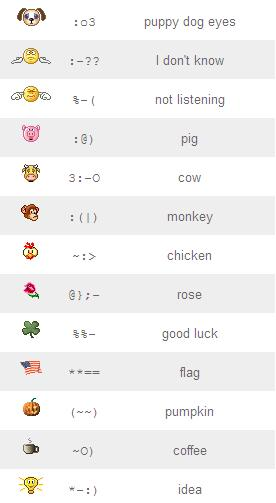
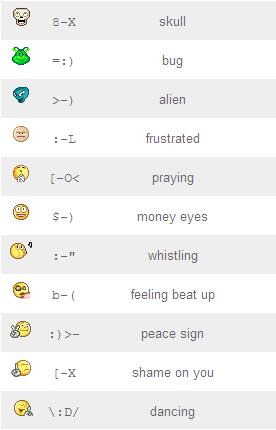
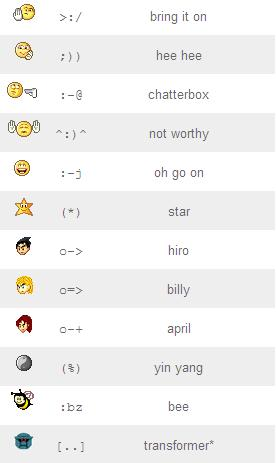
Yahoo! Messenger Free Hidden Emoticons
Besides the emoticons that you frequently use from the emoticon menu on Yahoo! Messenger, there are a set of hidden emoticons that you won’t find in the emoticon menu. Maybe some of you already knew about it, but for those who don’t, please check out the list of available hidden emoticons for Yahoo! Messenger. You can use them by typing the keyboard shortcuts directly into your message.
Add Yahoo Messenger to Your Website
Yahoo! introduced a new service called Pingbox , a live chat box (in the form of a Flash Widget) .You can embed it in any website or blog including your MySpace, Friendster, Hi5, Blogger, live space, etc...
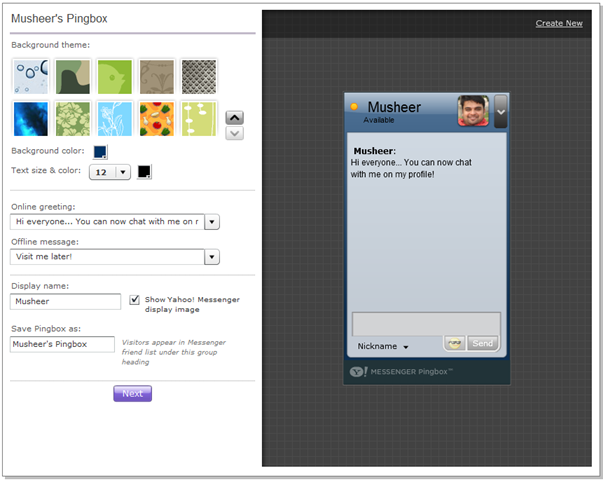
You can customize your Yahoo! Pingbox through the dozen or so themes available in the Pingbox studio. The Pingbox widget will automatically become unavailable When you go offline or set your status as ‘invisible’

Aug 6, 2008
Fun! Fun! Fun!... Browser Shaking
This is a fun little trick that can create a shaking screen on your web browser (i.e. Internet Explorer, etc..)
The trick is simply a small Java Script that causes your browser window to move to different positions, causing a shake of your entire screen. It's kind of cool to watch and see what Java Script can do! Try it out..
Use this trick at your own risk.
Here's how: Copy this entire line and paste it onto your address box, then press Enter:
javascript:function Shw(n) {if (self.moveBy) {for (i = 35; i > 0; i--) {for (j = n; j > 0; j--) {self.moveBy(1,i);self.moveBy(i,0);self.moveBy(0,-i);self.moveBy(-i,0); } } }} Shw(6) 
Jul 6, 2008
Rapidshare Renewed

Before, free users collected the point when a file was downloaded by another free user.
As a post in news of Rapidshare Site, this was mentioned :
"In the past, Premium and Collector's Accounts were only credited a RapidPoint when a file was downloaded by a Free User.
From now on, Premium Downloads can generate up to 255 additional RapidPoints per day. Those extra points will be displayed in the account overview in the Premium or Collector's Zone.
Once a day, the extra points will be added to the Premium or Collector's Account's RapidPoints balance and the extra points counter will be reset to zero."
Well, is it good or bad, we will see in coming days but it is still good for me as I am generating nearly 100 points everyday.
MassMirror : Smart Way To Upload To Multiple File Hosts

Now what is the use of that ? Many file hosts have daily download limits and other restrictions so if you want your file to be easily accessible it makes sense to distribute it far and wide. Also, if you're expected heavy traffic like a Slashdotting or Digg effect, mirroring files to multiple sites is a smart way to save on bandwidth costs. Currently, the file hosting servies supported by MassMirror are Rapidshare, Megaupload, Depositfiles, Sendspace, Zshare, Badongo, and 4filehosting.

How to Upload :
Either you can upload the file directly from your computer or you can specify the URL of a file that you want mirrored. After MassMirror gets a copy of your file, it re-uploads it to the 7 file hosts that it currently supports. This is extremely fast. After the uploading is over, MassMirror provides you the link of the file.

Conclusion :
MassMirror not only saves your time from re-uploading the files again and again, but it also saves your precious bandwidth. Hope this post prove useful to you. Waiting for your precious comments.
BitTorrent - Make Your Machine A Torrent Tracker
One of my friend referred me to an article where I was amazed to see the power of P2P model. The title of article revealed itself to me.
What they did was to use bittorrent to deploy the patches. By this, there was no need of buying more servers nor there was any need felt to increase the bandwidth.
Therefore this article is dedicated on how make your own machine a BitTorrent Tracker.
Server :
The server will consist of Ubuntu with all the typical applications of LAMP. We need to have Apache with MySql and PHP so that we can install a tracker such as phpMyBittorrent on it. Though the installtion can also be done on any Windows machine, still I would recemmond you to install Ubuntu.
In the tracker software, I would create several different categories based on the target systems that I would use. For example, there would be Windows XP, Windows Vista, Office 2007, etc. categories. Each category would have its own RSS feed.
Main Steps For Server :
1) Download phpMyBittorrent from here.
2) Extract the downloaded zip file to the www folder of Apache.
3) Open the URL "http://localhost/html/index.php"
4) Follow the instructions.
Client :
At the client side, you can use any torrent client like uTorrent, BitTorrent, or BitTornado. You can make the torrent from uTorrent which has an option to make torrents. Then upload that torrent to the server and start seeding it.
Conclusion :
I think that this type of a delivery system has great potential. You could even use it across slow bandwidth links or to deploy other software, not just patches.
This is a project that I am hoping to spend some time on over the next while but I am looking for your input/suggestions now so that I can hopefully avoid some pitfalls later. Any input would be greatly appreciated!

| Website: | bittorrent.com |
| Location: | San Francisco, California, United States |
| Founded: | September 1, 2004 |
| Funding: | $33.8M |
BitTorrent Inc is the company founded by the creator of the algorithm of the same name. The companies purpose to use the algorithm’s ability to transmit large quantities of data across the internet to legally sell content and help companies… Learn More
Orkut Toolbar 1.4 for firefox - Updated for firefox 3
 Many people ask me How add Signatures and format Texts like I do on orkut. Orkut Toolbar helps you to format the text of your posts in the Orkut forums, easily access all common functions of orkut, create and manage custom signatures and insert and view images and flash movies in orkutposts and scraps.
Orkut Toolbar helps you to format the text of your posts in the Orkut forums, easily access all common functions of orkut, create and manage custom signatures and insert and view images and flash movies in orkut posts, scraps and profiles.

Categories
With Orkut Toolbar all you need is type your entire text without any formatting code and then select the desired parts of text and apply the format using the toolbar buttons. Much like you do in OpenOffice, MS Word or any other text editor.
Works with:
- Firefox: 1.0 – 2.0.0.*
Get the Orkut Toolbar for Firefox 3.0
If you haven't taken a feel of Firefox 3.0 then i'll seriously recommend you to get it because it is the mother of all browsers i have used till now.
- Download the Orkut Tool Bar for Firefox 3.0 (Download)
- Save the file to your desktop.
- To install it, drag the file on to Firefox Browser Window.
- You can also right click and choose open with Firefox to install it.
May 3, 2008
Listen to FM Channels in Google Talk..
 I have been enjoying Hindi FM channel using my Google Talk. Even you can enjoy listening to number of FM station within your Google Talk software.
 Procedure is damn easy. This is done using Gtalk2Voip, it is a free and publicly open voice gateway for major Instant Messenger clients. Here are the steps to listen to any channel listed below: In case music stops, disconnect and try connecting again. Also, if 110 ID is offline, try to connect at some other time when it is online.
Make your Invisible Yahoo friends visible..
Is your friend always hiding in Invisible mode? Do you want to check out what display image your friend is using eventhough he is offline? Then here is the perfect solution....


Visit the site Vngrabber
Hope these site come in handy to you....Go give your friends a surprise......
May 2, 2008
Trackin Your Emails - Get notified when your Emails get Read!

If you ever wondered whether mails you sent ever gets read or just sent to trash, you can use a mail tracking service which allows email tracking.
Now how to use this service in simplest way…
- Create an account with them first.
- Then next time, whenever you send mail to someone@special.com just add .mailtracking.com to the email address. So in this case email address will become someone@special.com.mailtracking.com
- Now whenever someone@special.com read your email, you will receive notification mail from mailtracking.com
How it works… (Technical Details)
- Basically the change in email address will route email through mailtracking.com’ server.
- They add a small (around 3×3 pixel) white image which is almost invisible to human eyes in email body. The image will be hosted on mailtracking servers and a unique image is kept for each email message.
- So when someone opens email that image also get downloaded. Now mailtracking server logs the browser request for image (note that the request goes in background) and thus can mail you details which mentioned above.
Restart your Firefox without Restarting It.

If you are enabling an add-on or installing/changing the theme in your firefox the effect will be seen only after the Firefox is restarted make you wish if there was a Restart Button like you get when you Install a Add-on.
And if you were working on many tabs, invariably you loose all the tab information and because you can't restore a session if you accept to close tabs
Here is a simple solution that make you wonder why didn't the Firefox think of this ?

A simple Firefox add-on called Restarter ! Now if you need to change a theme on your Firefox or need to enable or disable a firefox add-on / extention all you need to do is Click on Restart Firefox from File Menu.
» Get Restarter Add-on

You will be prompted to agree to close the open tabs, All you tabs will be restored once firefox restarted.
Google Privacy Tips, Orkut style
Orkut Buyukkokten's Post - Orkut isn't the same social networking site that it used to be. When I created the site, there was less information to share and there were fewer sharing controls. Since, we've added ways for users to upload photos and post videos, include friend updates on user homepages, and send and receive scraps. To help you manage what you post on the site, and what you share with whom and when, we recently launched some new sharing features that give users control over who gets to see their photos, videos, testimonials, and scraps.
25 Tips To Optimize Your Blog For Readers & Search Engines
However, optimizing a blog is a bit different than your standard website search engine optimization (SEO), particularly because most blogs run off standard blog platforms, or worse, run as a hosted blog on someone else’s domain name. And there are design issues that can be unique to blogs which can impact your rankings. When you optimize your blog for the user experience, you make it easy for users to return and engage in your blog without dealing with any of the hassles that can cause them to abandon other sites or blog entries. Repeat visitors are the cream of your blog, so by following these tips you have given them the tools they need to return as well as the user experience that makes them want to come back. Fortunately, if you are on the case to make your blog rank well while not hindering your visitor’s experience on your site, there are definitely things you can check – and fix – to prevent any indexing issues from occurring, and ensuring your blog a happy and healthy existence in the search engines. So here is advice on how you can optimize that blog of yours for both users and search engines without alienating one or the other. 1) Dump The Default Template - Looks Count! 2) Just Say No To Bad Color Schemes 3) RSS Me! 4) Offer RSS & Feed Subscription Buttons 5) Offer Posts Via Email 6) Decide On Full Or Partial Feeds 7) Write Compelling Snippets/Descriptions 8) Pay Attention to How You Write. 9) Spelling Counts 10) Fontography Counts 11) Don't Forget Navigation 12) How Fast is Your Host? 13) Avoid Widget Overload! 14) Have Descriptive Titles 15) Look at your Cascading Style Sheets. 16) Post Often 17) Spread the Link Love 18) Be Aware of Your Anchor Text 19) Create Unique Stories 20) Use a Related Posts Plugin 21) Ping Other Sites 22) Buy Your Own Domain Name 23) Manage Your Trackback & Comment Spam 24) Use a Good URL Structure 25) Use Great Categories While some bloggers insist that search engine rankings will come naturally to those who wait, who really wants to wait for Google? A blogger can run into several unique challenges when it comes to optimizing for search engines, and it makes sense to get the jump on it now than simply hoping that if you write it, the bots will come. It is far easier to ensure you have a well optimized blog now than trying to figure out what the issue is 6 months down the road when only your blog’s index page is found in Google! Happy Blogging !!!! Everyone and their dog (yes, there are a few dogs out there with their own blogs) have started up a blog these days, but many people just aren’t taking the steps needed to optimize their blogs for both readers and search engines. While blogs can be business related (another blog about mesothelioma anyone?) they can also be personal where you talk about the great ham sandwich you had for lunch today or the crappy service you had at that trendy restaurant last night.
But whether your blog is business or personal, you should ensure that you are optimizing your blog for both your readers (after all, you want to keep those readers coming back) and the search engines. Unfortunately, optimization is an important step that far too many blogs seem to be skipping over, even those that have a broad appeal to surfers and have the potential to be monetizable.
I cringe when I see a blog using the “out of the box�? Wordpress or MovableType template. Hire a designer to create a unique look for your blog, or at the very least, take advantage of some of the free templates available and customize it a bit with a unique logo or a slight color upgrade.
While a hot pink with lime green color scheme might be your favorite, consider what your readers will be expecting. That color scheme might work perfectly on a teenage gossip site, but would look extremely out of place as the corporate blog for a men’s suit company. Likewise, gamers would think nothing of a black background on an Xbox 360 blog, but it would look horrendous on a parenting or pregnancy site. So while you should experiment with colors to find a good mix for your blog, keep in mind user experience and their expectations.
Make sure you have RSS available. Many hosted blogging solutions don’t have RSS automatically available, so you will need to add it. And when you do add it, ensure you have those RSS links in an obvious spot. Don’t tuck them away at the very bottom of your index page after your most recent 20 entries, or hide them on a separate “About Us�? page. Place all those handy subscribe links in your sidebar, which is exactly where people will look for them. If you use Feedburner currently, have a look at their new MyBrand option which allows you to host your own feeds for a seamless user experience.
Yes, when people want to subscribe to a blog, they will often look for that orange RSS logo as well as the logos of the standard aggregators such as Bloglines. So it is worth the time to add the most popular ones to your blog so visitors can easily do their one-click subscriptions to your feed without it require much effort on their part. If you make it hard to subscribe, most just won’t bother. FeedButton offers a service that allows you to offer multiple RSS aggregator and feed reader buttons with a single expanding rollover button.
Some people just don’t get RSS. So cater to them by offering them an option to get your blog posts by email instead. The most popular service to do this automatically is FeedBlitz, although there are also many other tools available to do this.
Do you offer full feeds or partial feeds? This is a personal preference, and is often dependent on what market space you are blogging in. One option is to offer two feeds, one being an ad-supported full feed, with an RSS ad included, and the other being an ad-free snippet copy of the feed, where readers won’t see ads but will have to actually view your blog in order to read your full entry. But this will often come down to personal preference, and the preferences of your readers.
If you do use snippets for your RSS feed, be sure to make them compelling or leave readers with a cliffhanger to encourage them to click and read the full entry. This will get you many more readers to your entries than just using the default option of including the first X number of words in the blog post as the snippet. Use your excerpts to generate interest and clicks.
One of my favorite bloggers has the unfortunate habit of writing detailed long entries… without a single paragraph break and with the double whammy of also writing with a font size smaller than usual. If I look up for a moment, it is hard to find my place again in her 1000 word entries. As a result, I don’t read it as often as I would like to, simply because reading it is such a painful experience.
Spelling is also worth mentioning. Add one of the many spell checkers to your internet browser and run a quick spell check before you publish your entry. Every word doesn’t have to be perfect, and I am certainly guilty myself of letting on occasional typo slip through unnoticed. But I also get annoyed when I am reading typo after typo after typo in an entry. And yes, if it happens enough, I will unsubscribe out of sheer frustration.
Make the font easy to read. Some bloggers think it is cool to have their handwriting turned into a customized font, or use a trendy font that would be better suited to a scrapbook layout. But not everyone has those wild and weird fonts installed, which means that those people will see a standard font such as Times New Roman, and it can really kill the look of your blog. So instead design the text of your blog entries to use a standard font in a standard size.
Is this blog part of a larger site, such as a corporate blog on a site for a major company? Don’t just link to the main page of the blog. Syndicate your recent headlines in the sidebar to encourage visitors on the main site to check out the blog too.
Another one of my favorite blogs has such a slow response time when I click from the snippet in my RSS to the full blog entry that I only actually end up waiting around for it to load about 10% of the time. Don’t lose readers because your hosting company thinks 30 seconds is a perfectly reasonable amount of time to load up a page.
Yes, there are definitely some cool widgets you can add to your blog, such as MyBlogLog or a Flickr photo box tied to your photo gallery. But be aware that having a large number of javascripts can slow down your site. So don’t sacrifice timely loading time for nice-but-not-all-that-necessary widgets.
Some blog software actually makes your entry titles seem pretty repetitious in the search engine result pages, and can result in a lower click through than you might have had otherwise with highly optimized titles. If your title’s say something like “Jason’s Tech Industry Rants & Ramblings Blog >> New Xbox 360 title announced for April release�? you should change it to “New Xbox 360 title announced for April release�?. Unless you are well known as an authority blog in that market, the blog name is simply wasting crucial space at the beginning of the title tag and causing the rest of the entry title to end up getting truncated in the search results. And make sure your titles actually enhance the entry and don't leave the reader wondering what on earth the blog entry could be about. Ensuring you have great titles when you have a small readership and are depending on search engines to send you readers is one of the first steps you should take to optimize your blog.
Most blogs use a tremendous amount of CSS to create that custom look. And while most of the “out of the box�? designs that come standard with the installed template include all CSS in an external file, there definitely are some blog designers who will put their CSS on the individual template pages rather than placing it all in an external CSS file. And when you don’t place CSS in an external file, it can clutter up your pages and result in the most important part of the page – the entry text – being much further down in the HTML code when it has to go after the masses of CSS coding lines.
The more frequently you post, the more likely Googlebot and other bots will stop by on a more regular basis. If you only post once in a blue moon, expect that it might take a while for Google to stop by and see that you actually have updated again. Google loves updated fresh sites, so it make sense to feed the bot what it wants.
If you are blogging about a story, link up the original story as well as other’s commentary on the same topic. When you do so, you will often make those bloggers aware of your blog’s existence (if they weren’t already) when people click from your blog to theirs. And it also increases the odds that they will either link to you on that story or on something you blog about in the future.
When you link to someone’s blog entry, or even a previous blog entry on your own site, make sure you link well. This means instead of linking to someone’s blog entry with the anchor text “click here�?, you link to them using anchor text related to the blog entry, such as “Jason’s scoop on the new Widget Xbox 360 game�?.
Bloggers love to link to other bloggers. When you write original blog entries, rather than just rehashing something someone else has already said, you increase the odds that someone will find yours interesting enough to link to and talk about. And a reader of that blogger’s blog might read the entry and decide to write something about what you said as well, meaning yet another link as well. And if you are fortunate, it will go viral, meaning suddenly it seems like every blogger in your market space is talking about what you wrote. Rinse and repeat as often as possible for maximum exposure and link juice.
Not only does this make sense to keep readers around for other articles on your site that are related to your current post, but it also allows you to deeplink from a current page on your blog to older entries. Often, older entries get buried several pages deep on an archive page, and this allows you to showcase entries written months or years previously and give those “oldies but goodies�? an extra little kick in the search engines. There are several related post plugins available depending on which blog platform you use.
When you add a new blog entry, you might want to ping site such as Technorati and FeedBurner to let them know you have a brand new blog entry on your site. You can also now ping Google’s Blog Search as well for faster indexing in their blog search engine at blogsearch.google.com. Automatic pinging is an option in the control panel of most blog platforms including WordPress and MovableType. And Ping-o-Matic offers a service that allows you to quickly pick and chose what to ping.
Don’t always think your free blog hosting company will be around forever. What will you do if you build up a loyal readership then one day you discover yourblogname.examplebloghost.com no longer works because examplebloghost.com has gone out of business? You want to make sure the search engines have a URL they will always find your blog at, rather than have to worry about them re-indexing your previously well-ranked blog on am entirely new domain… that is if you are lucky enough to get your blog posts from your free hosting company. Both Google's Blogger & Wordpress allow you to use their hosted blog service while displaying it on your own domain instead of their own branded one.
You don’t want Google or Yahoo to find masses of spammy links on your site to all manner of less-than-quality sites submitted to your blog by a blog spammer. Use one of the many tools on the market for your blog platform to manage both comment and trackback spam.
Don’t use “permalinks�? such as www.yourblogsite.com/?p=123 . Instead, use www.yourblogsite.com/2007/01/01/blog_entry_title_here. Most blogging platforms allow you to change from the standard numbered permalinks to this style of search engine friendly ones. And just in case the blog platform you use has funky dynamic URLs for each entry, you will want to ensure that the bots can crawl them easily or use a mod rewrite to create a good structure such as in the example.
When you write a post, place it in 1 to 3 different categories related to the post. For example, and article on the television show Grey's Anatomy could go under "Grey's Anatomy" and "ABC". Avoid the temptation to add it to ten different categories though, such as including "drama," "hospital," "interns" and "Seattle" because that is just overkill. But if you wrote something great on Grey's Anatomy, you have made it easy for your reader to find all your posts on Grey's Anatomy because they simply have to click on the category link at the top or bottom of the entry.
How To Make Your Blog Load Faster ?
 When people come to your Blog via a Search engine.. you just get maximum 10 seconds to hold their attention. If thats not enough to Load your Blog , then you are gone....
A good web host is essential, although, ensuring your blog not wasting valuable bandwidth on poorly optimized images, and unnecessary scripts and widgets is also important. So how do you optimize your Blog for the best performance? Here are some key tips:
Optimize Images
I think having attractive images in your articles is a key part of blogging, but I also think you need to optimize images so that they not any larger than they need to be. If you are lucky enough to have a copy of Photoshop, it is ideal for this task. A few rules which will help you out are:
- Save images that use a limited pallet as .gif or .PNG. i.e a logo that just uses red, white and blue.
- Save images that use the full color spectrum of colors as .jpg i.e a photo of yourself.
If you are saving for the Internet you should use “Save for web”. The aim is to get the final file size as small as possible without wrecking the appearance of the image.
PNG & Gif (indexed): Set the total amount of color to the lowest value possible without effecting appearance of the product. You can play with dither, for some images it will help remove artifacts, by adding a bit of noise. Raise the value of Web snap as high as you can go without making the final product look ugly.
Jpg (RGB): Lower the quality to as low as possible without making the final product look ugly, and without adding too many artifacts, you can also add some blur which may remove so ugly artifacts, but don’t get too carried away.
Make sure that if you are resizing images that you set the mode to RGB. Indexed images don’t resize well.You should ensure that images are cropped to remove any unnecessary parts, and resized to the correct final size. Don’t waste valuable bandwidth by using html code to resize an image.
Use A Minimalist Theme
Attractive graphics and excessive use of plug-ins in your theme can add to the file size of your site, and raise your loading time. So selecting a minimalist theme is a great way to reduce the size of your Blog.Compress the Stylesheet and Javascript files used
You can compress Javascript and the Stylesheet used in your theme. To compress Javascript you can use a Javascript compressor. For the CSS files, you can remove the comments, and remove blank lines and spaces using your favorite text editor. This will optimize your set up a small amount.Reduce Overall Latency by Reducing HTTP Requests
PlanetEnjoy writes about the importance of reducing HTTP requests:
Every HTTP request, or loading each item on your website, has an average round-trip latency of 0.2 seconds. So if your site is loading 20 items, regardless of whether they are stylesheets, images or scripts, that equates to 4 seconds in latency alone (on your average broadband connection).
So it is important to ensure that you are not including an unnecessary amount of HTTP requests.
Don’t Rely on Other Sites!
If you are loading content from other web sites it is going to slow your loading time. For example both the widgets at the bottom of this page load from other servers, Blogrush and Blogcatlog. If either of these servers are having bad days the widgets can take an age to load. This is part of the reason why I have them in the footer, so any lag doesn’t stop any other content from loading. Ad networks, badges, widgets, images, scripts may all be loading content from other servers. For optimal performance you need to rely as little as possible on other servers.


 Posts
Posts


